FAQ
Here you can resolve any doubts that you may have
Open the NairaWaves app and log in.
Tap on “Electricity” or your desired service category.
Select your electricity provider (e.g., PHCN, IKEDC).
Enter your meter number and amount.
Choose your preferred payment method and confirm.
Your token will be delivered instantly and meter updated in real-time.
ATM/Debit card (via Paystack or Flutterwave)
Bank transfer to your unique wallet account
Airtime-to-cash conversion
Once funded, use your wallet balance to pay for services.
If your card fails:
Check if your card is enabled for online or international transactions.
Try a different card or use bank transfer.
Contact your bank for support.
If funds are debited without success, contact NairaWaves support with the transaction reference.
Don’t worry. If you’re debited but the service wasn’t delivered:
Confirm if the transaction appears in your NairaWaves history.
Wait a few minutes – some services may be delayed.
If not resolved, contact support with the RRR or Transaction ID.
Refunds or reversals typically occur within 24–48 hours depending on the bank.
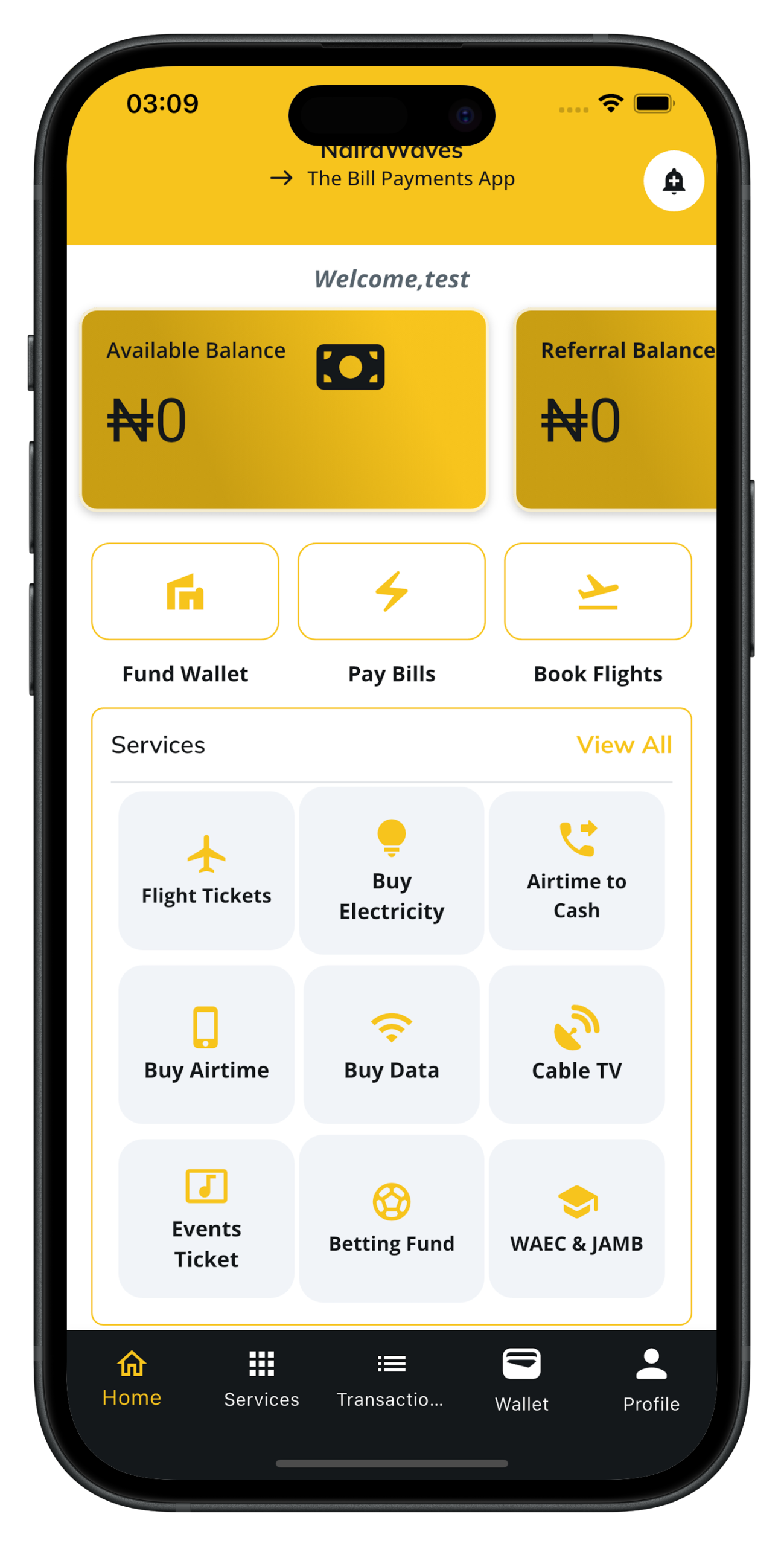
NairaWaves is a digital lifestyle platform for Nigerians, offering services like:
– Airtime & data top-up
– Utility payments
– Flight booking
– Bet account funding
– Cable TV subscriptions
– Airtime/data to cash conversion
– Education payments and more
It’s designed to simplify and secure everyday payments.
Yes. NairaWaves uses bank-grade security encryption, secure payment gateways (e.g., Paystack, Flutterwave), and OTP authentication to protect your data and transactions.
You can add money by:
Paying with debit/ATM cards
Making a bank transfer to your wallet account number
Converting airtime to wallet balance
Your balance updates instantly after a successful transaction.
Once a payment is successfully processed, it cannot be cancelled. Always verify biller/service details before confirming a transaction.
Unfortunately, payments made to the wrong biller or account cannot be reversed unless the service provider agrees to refund. Always double-check all details before confirming.
Open the NairaWaves app.
Go to the “Wallet” tab and then “Transactions” section.
View all completed, pending, or failed transactions with full details.
NairaWaves offers competitive rates and low-to-no service charges depending on the service. You’ll see any applicable fees before confirming payment.
Currently, NairaWaves does not support recurring payments. However, this feature is coming soon to help you automate bill payments.
You will not be charged.
If you were debited, the amount will be refunded automatically or manually within 24–48 hours.
Reach us via:
In-app live chat support
WhatsApp or email support (check the app’s “Help” section)
Phone call
Support is available 24/7 to help resolve any issues.
Yes. If your transaction fails and you were debited, your refund will be processed within 24–48 hours based on the payment method and bank response.
Immediately:
Change your password or PIN.
Contact NairaWaves support to freeze or secure your account.
Monitor your transaction history for any unauthorized activity.
Always enable 2FA and use strong login credentials.
Yes! Download the NairaWaves mobile app on:
Google Play Store
Apple App Store
It’s free, easy to use, and lightweight.
Navigate to Profile > Edit Profile in the app to:
Update your name, phone, or email
Add or remove cards
Change your password or PIN
Yes! NairaWaves rewards loyal users with:
– Cashback promotions
– Referral bonuses
– Special discounts
Check the “Promotions” or “Rewards” section regularly.
We use:
– End-to-end encryption
– SSL certificates
– Secure APIs
– Two-Factor Authentication (2FA)
to ensure your data and funds are always safe.
Join the Wave Today
Download Naira Waves on Google Play and Apple Store and experience the freedom to manage all your digital needs in one place. Fast transactions, low charges, and full control at your fingertips.